
OAuth App Abuse: A Security Gap Attackers Love
- Vlad Johansen

- Mar 13
- 4 min read
Hi folks. So, let's talk about these important security gaps we all know exist in many tenants worldwide today and which tools we can use to detect and prevent these gaps. We all know that OAuth apps in Entra are very common. Story from the field 1: A whole team was migrating files and emails from a file server and on-prem mail server in 2020 to SharePoint Online and Exchange Online and used some third-party tools to do this. But these permissions still exist on the tenant. The app is named CodeTwo Migration Tool something something and had several read.write permissions assigned. In 2026 they are still there.
Story from the field 2, to make it even more fun. Attackers compromised a Global Admin account (had MFA) and used an existing enterprise application and gave it many read.write app permissions. They started to change attachments on C-level mailboxes, created forwarding rules, exfiltrated data from SharePoint.....The best of all? Really hard to detect without proper detection tools.

While we can easily control user consent settings in Entra ID, we need to have a way to actually review them as well from time to time. To control user consent to applications in Entra go to: https://entra.microsoft.com/#view/Microsoft_AAD_IAM/ConsentPoliciesMenuBlade/~/UserSettings

I strongly recommend you review these settings and adapt them to your business needs.
Don't forget about these settings if you require admin to review user consent settings.

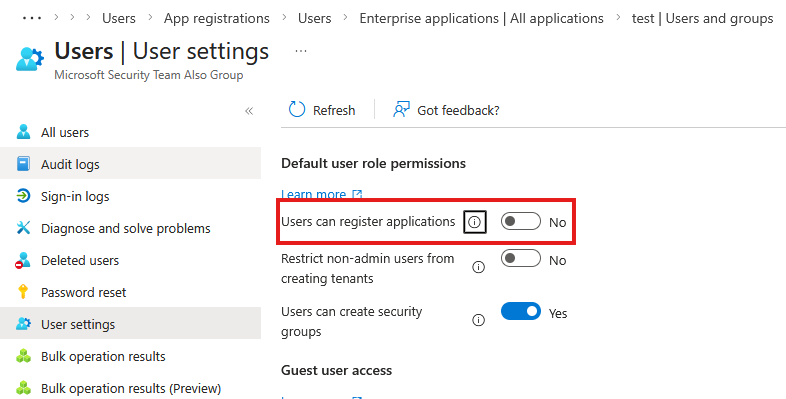
Restrict User to register applications here https://entra.microsoft.com/#view/Microsoft_AAD_UsersAndTenants/UserManagementMenuBlade/~/UserSettings/menuId/
For review: One of the methods can be Access Reviews. But unfortunately the thing here is that it can't review and revoke API permissions, only users assigned to the application. Of course, we can do it at the same time manually, but what about unexpected grants meanwhile or after when we don't review them manually? In worst case it can be application permissions....
Please have in mind that Access Reviews for applications and groups are Entra ID P2 functionality.
So, what do we do than?
There are several scripts out there on GitHub which you can run manually or on schedule and review permissions....
Oh, but wait! There's this tool called Defender for Cloud Apps.
Defender for Cloud Apps, you ask? Indeed, it's that magical unicorn that many organizations with premium licenses tend to overlook, not realizing it's a hidden game changer. And guess what. We’ve got agents now too, but I’ll save that juicy tidbit for another blog post.

So how to use Defender for Cloud Apps to detect risky permissions? It's pretty easy, and I will show and explain it in this blog post.
License requirements
Defender for Cloud Apps standalone license or
Business Premium/Microsoft 365 E3 + Defender or Purview Suite
or Microsoft 365 E5
to use this feature +++
Before we start, a little heads to you

Go to security.microsoft.com
Navigate to Settings-> Cloud Apps

Choose Connect an app and Connect Microsoft 365, wait until it's connected (may take a good while)

Go to Service status under App Governance (on same page) and check that App Governance are turned on

When you have done it, go to Cloud Apps -> App Governance PS: Please have in mind that it may take up to 10 hours to get this data first of all if you have not been using App Governance before.

Microsoft Learn
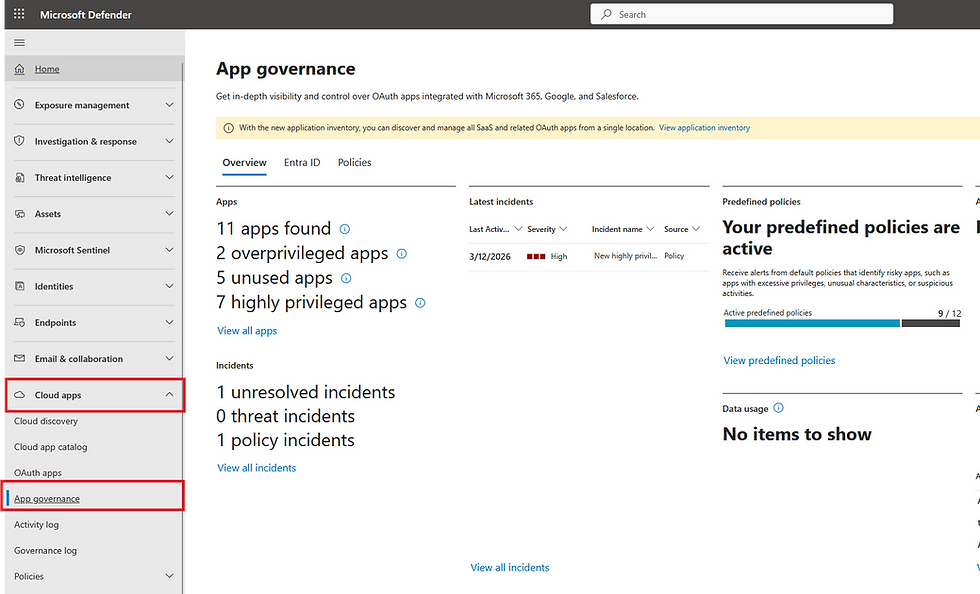
By navigating to Entra ID you will get an overview of all Entra Ouath Apps in your environment. You can sort by privilege level

By clicking on selected app you will get more insights to all assigned permissions with privilege indicators etc

Now, let's investigate Policies section

Microsoft have pre created some app policies already, which is even default on as you see on the list. Only 1 of them are created by me manually.
I want to test this built in template today. Just press on Create new policy on same page to choose from template, you can also create custom policy

I'll chose Severity: High

Customize the policy

All Apps

I'll leave this one as is

I'll choose Disable application just to see how it works

Status: Active and Review all settings and Finish

Now let's go to Entra portal and create a dummy app
I gave this app Mail.Read.Write and Policy.ReadWriteConditonalAccess

Now, let's wait A few hours later, my inbox finally dinged with an email.

Let's investigate alert page

PS:

So we can see all relevant information and application got deactivated as well.
Let's double check this in Entra


However, it took some time for Defender to detect, alert, and respond to this issue. Therefore, it would be more efficient to ingest logs into Sentinel for a quicker response. Alternatively, you can create custom alerts with detection queries in Azure Monitor and forward alerts to your email from there. Take a look at this GitHub repository for effective detection queries!
Hunting-Queries-Detection-Rules/DefenderXDR at main · SlimKQL/Hunting-Queries-Detection-Rules
And yes this is another important thing, if you don't set up alerts in Defender XDR, your better do , otherwise you'll never receive emails :)


Wrapping up Good detection tools today is no longer nice to have, it's must have for all organization, doesn't matter which size. And speed on detection and response matters.
A smart homeowner doesn't just lock the front door –they lock all doors and windows, have a smart doorbell, sensors, cameras, alarm system, a dog, and a neighbor who notices. Your organization deserves the same layers.


Comments